

Muse for Small Business: How Meta’s New AI Agent Can Help Businesses
Small business owners often have to do many different jobs. These include marketing, talking to customers, selling, managing money, running the business, creating content and doing daily administration. Meta is now introducing an AI-agent approach to these challenges with Muse for Small Business. This is an expanded version of its Muse personal AI agent, designed to work with the tools businesses already use.
Announced by Meta on 29 September 2026, Muse for Small Business allows business owners to give the agent more general goals, such as running parts of their business or finding new customers. It can connect to business accounts and third-party tools, understand the business context, analyse information, and help move work forward.
Muse is an AI business assistant. It can work towards a goal, not just answer questions.
Key Takeaway:
- Muse for Small Business is Meta’s AI agent designed to help small businesses work toward broader business goals, not just answer individual questions.
- It can connect with Facebook, Instagram, Meta ad accounts, and 15+ business tools such as Shopify, Canva, Figma, QuickBooks, Slack, Notion, and Stripe.
- Businesses can use Muse for sales analysis, growth planning, marketing, advertising, financial reviews, email management, and content workflows.
- Muse can use business context such as products, brand information, storefront data, customer records, and marketing activity to support its tasks.
- Business owners remain in control: Meta says nothing is published, sent, or spent without user approval, making human review an important part of the workflow.
Table of Contents
What Is a Muse for Small Business?
Muse for Small Business is a new addition to Meta’s Muse, which is an AI tool designed for use in small businesses.
The original Muse was introduced earlier in September 2026. It is an AI agent designed to do work on a person’s behalf rather than simply generate answers. Meta says Muse can develop plans around goals, coordinate tasks, carry on working after the user leaves the app, and return when it needs approval or when something changes.
As more and more small businesses grow, Meta is connecting Muse to the systems that entrepreneurs already use to manage their companies.
Business owners can give Muse a goal, such as:
- Running parts of their business
- Finding new customers
- Analyzing sales and marketing performance
- Improving advertising and content
- Reviewing business finances
- Managing information from email and calendars
- Coordinating work across connected business applications
The key difference is that Muse can work with the context and data from connected business tools, rather than treating every task as a separate conversation.
How Does Muse for Small Business Work?
The basic workflow is relatively straightforward.
1. Give Muse a Business Goal
Instead of asking only a one-off question, a business owner can describe what they want to accomplish. For example: “Analyze this year’s sales, campaigns, and social performance and create a growth plan for next year.”
Muse can then work across the information available through the connected services to help develop that plan. Meta specifically highlights this type of sales, campaign, and social analysis as one of its suggested business use cases.
2. Connect the Tools Your Business Uses
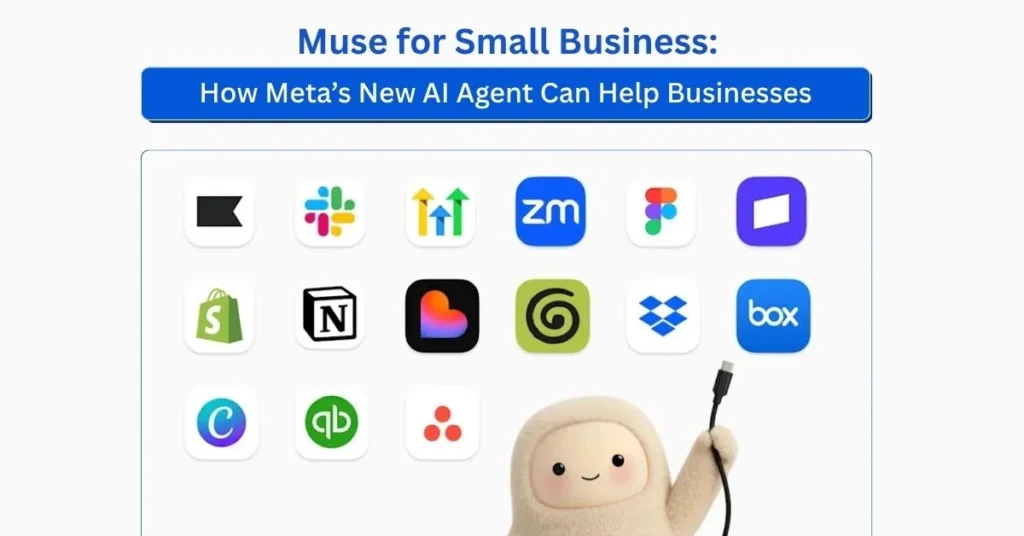
Muse can connect with your Facebook and Instagram business accounts and a growing range of tools that businesses already use. Meta currently lists connectors such as Asana, Box, Canva, Dropbox, Figma, Granola, HighLevel, Intuit QuickBooks, Klaviyo, Lovable, Notion, Shopify, Slack, Stripe and Zoom.
Muse AI can also connect to your Instagram professional account, Facebook Pages, and Meta ad accounts. Meta says more connectors are coming, and Muse supports custom connectors for services that it does not currently support directly.
3. Muse Uses Business Context
According to Meta, Muse can connect to the professional account analytics of Instagram, Facebook Pages, and Meta ad accounts.
It can also work with information related to a company’s:
- Brand
- Products
- Storefront
- Financial records
- Customer records
- Marketing activity
- Business communications
This is important because it allows the agent to work on tasks using information from different parts of the business. This allows Muse to work with information from different parts of the business.
4. The Business Owner Remains in Control
One of the most important parts of Meta’s announcement is the approval system.
Meta says that nothing is published, sent or spent without the user’s approval. This means that when you connect an account, Muse cannot automatically publish content, communicate externally, or spend money.
This is important for small businesses because what they do with their customers, how much they spend on advertising, their financial information and what they say to the public can directly affect their business.
What Can Small Businesses Use Muse For?
Meta AI shows how Muse can be used in several different ways for small businesses. These show how the agent can be used in different areas of business operations.
1. Analyze Sales and Create Growth Plans
A small business might have information about sales, marketing campaigns, how well their social media is doing, and customer data spread across different platforms. Muse can bring together information from different services and help you to look at it.
For example, a business owner could ask Muse to:
- Review sales performance
- Compare campaigns
- Analyze social performance
- Identify areas that need attention
- Develop a growth plan based on business goals
Meta gives Muse a specific task. This is to look at yearly sales, marketing campaigns and social media activity. Then they are to create a plan to help the business to grow in the next year. This can help turn unstructured business information into a more organised planning process.
2. Stay on Top of Business Tasks
People who own small businesses often have to do lots of different things at the same time, like dealing with emails, their calendars, messages, documents, and other responsibilities.
Meta says that Muse can help you find things that need your attention in places like email, calendars and news apps. It can also flag emails that need to be answered and prepare first drafts. This makes Muse potentially useful for office work that otherwise takes up time during the day.
3. Improve Marketing and Advertising
Marketing is another area where Muse can combine information from different sources. A business owner could ask it to check how well advertising and content is working, find out what is and isn’t working, and prepare a campaign for the following week.
Meta AI also highlights the importance of using current trends in this type of analysis. If you don’t have a dedicated marketing team, this could help with the research and planning stages of creating a campaign.
4. Review Business Finances
Muse can also work with financial information when the right business tools are connected. Meta AI gives the example of asking Muse to check the company’s monthly financial performance and find any unusual expenses.
With connectors such as Intuit QuickBooks and Stripe, the agent can potentially work with information from financial and payment workflows, as long as the business owner has given permission. But the business owner or a financial professional should still check the financial analysis created by AI before important decisions about money are made.
5. Create and Organize Business Content
Muse works with tools like Canva, Figma, Notion and other apps that help you get things done. This makes it easy to get your content and creative work done.
For example, a business could use connected tools to go from having an idea to making something.
Idea – Planning – Content – Design – Review – Publishing
Meta says that the Canva integration lets users work with their existing templates and tools while keeping their brand context in conversations with Muse. This could be useful for businesses that need regular social media posts, presentations, promotional materials, or other marketing assets.
Muse Connects Different Business Tools
One of the most important parts of Muse for Small Business is its connector ecosystem. A normal small business might use one accounting application, another for selling things online, another for planning projects, another for designing things, and Meta’s own platforms for social media and advertising.
Muse is designed to connect these systems.
| Business Area | Examples of Connected Tools |
| Ecommerce | Shopify |
| Accounting & finance | Intuit QuickBooks |
| Payments | Stripe |
| Design | Canva, Figma |
| Project management | Asana |
| Communication | Slack, Zoom |
| Customer/marketing workflows | Klaviyo, HighLevel |
| Productivity & knowledge | Notion, Box, Dropbox |
| Social & advertising | Facebook, Instagram, Meta ad accounts |
You can find the list of connectors in Muse’s app settings, and more integrations are being planned, according to Meta.
Muse Can Work With Existing Business Context
One of the biggest challenges with generic AI tools is context. An AI model might be able to write a good marketing caption, but it might not automatically know:
- What products a company sells
- How the brand normally communicates
- What customers frequently ask
- Which campaigns have already run
- What the company’s financial performance looks like
- Which tools contain the company’s information
Meta says that Muse can start by understanding a business when its important accounts and services are connected.
According to Meta, this can include understanding what a business sells, how its brand sounds, and what customers keep asking about. This is what makes an AI agent more useful for regular business workflows than a tool that generates text on its own.
Security, Permissions and Approval Controls
If you give an AI agent access to business information, there are important security and privacy issues to consider. Meta says that Muse was designed with special infrastructure and permission controls. The broader Muse system runs in a special Muse Secure VM, where the agent and connected data are kept.
Meta says a separate Sentinel agent controls whether Muse can access the internet. The agent can also require user permission for sensitive actions. For Muse for Small Business specifically, Meta emphasises that users remain in control and that nothing is published, sent or spent without their approval.
Businesses should still carefully consider which accounts they connect and what permissions they provide. Businesses should review AI-generated analysis and proposed actions before they affect customers, finances, advertising budgets, or public-facing communications.
What Are the Potential Benefits for Small Businesses?
Muse for Small Business could be particularly useful for companies where the owner or a small team handles multiple roles.
Reduced Administrative Work
Tasks such as reviewing information, preparing drafts, organizing work, and identifying items that need attention can consume significant time.
An agent can help consolidate some of these activities.
- Better Use of Existing Business Data: Businesses already generate information through e-commerce platforms, accounting systems, social networks, advertising accounts, customer tools and productivity software. Muse is designed to work with those connected sources.
- Faster Marketing Workflows: Instead of starting every campaign from scratch, businesses can use existing performance data, brand context, and connected creative tools to develop campaigns and content.
- More Accessible Business Analysis: Even small companies without their own analysts can use AI to help them look at things like sales, marketing and money stuff. This can show them where they need to pay more attention.
- One Interface for Multiple Workflows: Instead of copying and pasting information between different apps, the agent can act as a link between different parts of the workflow.
What Muse Does Not Replace
Even though Muse can do a lot, it shouldn’t be used to replace every person in a business. Business owners still need to make decisions about:
- Business strategy
- Financial commitments
- Hiring
- Pricing
- Customer relationships
- Legal and regulatory matters
- Brand positioning
- Major marketing investments
AI can help analyse information and prepare work, but the business owner must still review important decisions and approve important actions. This is especially important when the agent has access to business accounts and customer or financial information.
Who Could Benefit From Muse for Small Business?
Muse’s approach could be useful for several types of small businesses.
- Ecommerce Businesses: An e-commerce owner could connect their storefront, marketing, payment and productivity tools and use Muse to help analyse sales and how well campaigns are performing.
- Local Businesses: Muse could be relevant to restaurants, retailers, service providers, ecommerce businesses, and other small companies that manage multiple business functions.
- Small Marketing Teams: A small marketing team could use Muse to analyse campaigns, organise ideas, prepare content, and coordinate work across creative and productivity tools.
- Solo Entrepreneurs: If you are a company founder who has to deal with almost every part of your company, an agent who can help with research, planning, organisation and repetitive tasks could be particularly useful.
- Growing Businesses: As a company adds more software, there can be more disconnected workflows. A connected AI agent could provide a shared layer across those systems.
The Future of AI for Small Business
The way AI is being presented to business users is changing. The first generation of generative AI focused a lot on creating content and answering questions.
The next step is to take action across different applications that are connected. Meta’s announcement shows this change: Muse can be given a business goal, connected to the tools where business information already exists, and used to help get work done.
Meta also says it plans to add more connectors, skills and business capabilities in the next few months. This could make AI agents more important for small businesses that need to do more without adding complexity to their technology.
Final Thoughts
Muse for Small Business uses Meta’s AI-agent approach to make everyday business work easier. Muse can connect to services like Shopify, Canva, Figma, QuickBooks, Slack, and Meta business accounts. This helps businesses analyse information, organise tasks, plan marketing activities, and work towards their goals.
The main difference between this and a normal AI chatbot is that this one focuses on workflows that involve multiple steps and are connected to each other, rather than just answering single questions.
For people who own small businesses and have a lot of responsibilities, Muse is another way for AI to become a normal part of day-to-day business operations. It does this by letting the owner check and agree on important actions.
FAQs
1. What is Muse for Small Business?
Muse for Small Business is Meta’s AI agent designed to help small businesses work toward broader goals, analyze business information, manage tasks, and work across connected business tools.
2. What can Muse for Small Business do?
Muse can help with sales and marketing analysis, growth planning, advertising and content workflows, business finances, email and calendar tasks, and other business activities using connected tools.
3. Which tools can Muse for Small Business connect to?
Muse can connect with Facebook and Instagram business accounts and third-party tools including Shopify, Canva, Figma, QuickBooks, Slack, Notion, Stripe, Asana, Dropbox, Box, Klaviyo, HighLevel, Granola, Lovable, and Zoom.
4. Does Muse for Small Business make decisions or take actions automatically?
Meta says users remain in control of important actions. Nothing is published, sent, or spent without the user’s approval.
5. How can Muse help small businesses save time?
Muse can help bring information from connected business tools together, identify tasks that need attention, analyze business performance, and support marketing and content workflows, helping reduce repetitive coordination across different applications.