

White-Label Image Editor: Embed Powerful Editing Into Your Platform
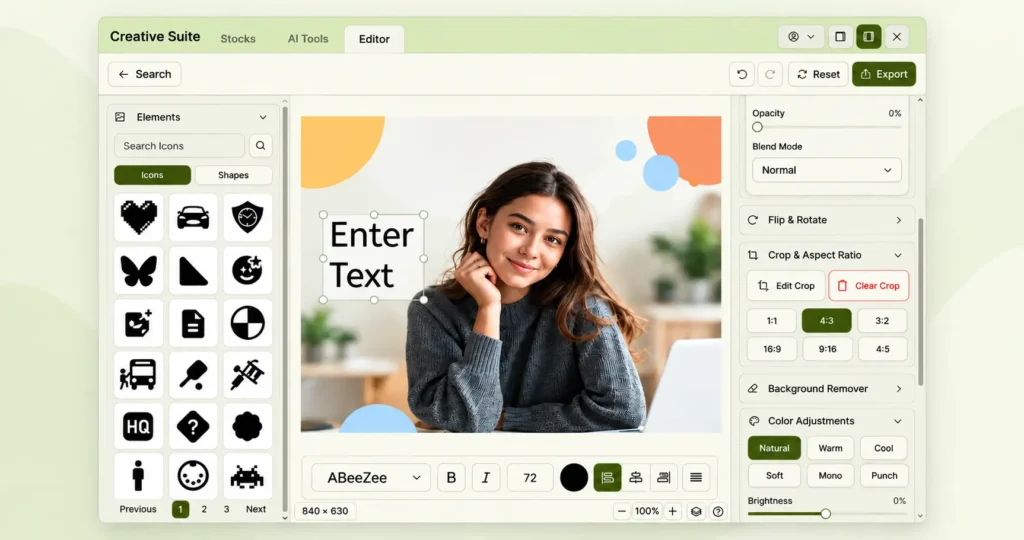
Modern SaaS, eCommerce and digital platforms are increasingly requiring creative tools to be built directly into their products. Users want to be able to resize images, remove backgrounds, add text and apply edits without having to leave the platform they are already using.
However, developing a comprehensive image editor in-house can require substantial development resources, infrastructure, maintenance, and continuous feature updates.
A white-label image editor offers an alternative solution. Rather than directing users to a third-party application, businesses can integrate a customisable image editing experience directly into their website, SaaS product, CMS or digital platform.
With an embedded solution such as the Pixey AI Creative Suite, businesses can offer image editing and creative functionality while maintaining their own branding and user experience.
Key Takeaway:
- A white-label image editor lets SaaS, eCommerce, CMS, and other digital platforms offer image editing directly within their own products.
- Key capabilities include AI image generation, one-click background removal, drag-and-drop functionality, asset libraries, custom branding, high-quality exports, and scalable infrastructure.
- Businesses can benefit from stronger brand consistency, improved user retention, lower development effort, new revenue opportunities, scalability, and greater product differentiation.
- Common use cases include SaaS platforms, eCommerce stores, website builders, and print-on-demand businesses that want to keep creative workflows within their own platforms.
Table of Contents
What Is a White-Label Image Editor?
A white-label image editor is a tool that businesses can add to their own products and promote as part of their platform.
Instead of asking users to:
- Download an image
- Open another editing application
- Make changes
- Export the image
- Upload it back to the original platform
You can edit content directly on the website. This makes it easier for businesses to make creative functionality part of their main workflow.
White-Label AI Solutions: What They Are and Why Businesses Are Adopting Them
Why Choose a White-Label Image Editor?
An image editor can help businesses improve the user experience while keeping creative workflows within their own platform. Instead of sending users to other websites for editing, businesses can offer this service directly on their own website or app.
Here are some of the main benefits:
- Keep Your Brand at the Center: A white-label editor can be changed to match your platform’s branding, allowing users to edit and create visual content without leaving your product.
- Reduce User Drop-Off: If you keep the editing experience within your platform, users won’t need to switch between different applications. This makes the workflow smoother and more connected.
- Save Development Time and Resources: It takes a lot of engineering effort, infrastructure, and ongoing maintenance to build a complete image editor. A white-label solution provides ready-to-integrate editing capabilities, allowing your team to focus on your main product.
- Deliver a More Complete User Experience: Combine image editing with your current platform to give users a simpler way of creating, customising and managing visual content.
- Scale With Your Product: As your user base and creative requirements grow, an integrated editing solution can help you expand your platform’s creative capabilities without rebuilding the entire editing infrastructure from scratch.
Essential Features of a Modern White-Label Image Editor
The best image editor that you can’t see the brand name of should do more than just provide basic editing tools. It should be easy to use and fit in with your website while keeping your brand identity.
From editing tools and AI-powered options to asset management, customisation, and integration, the following features can help ensure your image editor is useful for your users and supports your platform’s long-term goals.
1. Asset Libraries:
A good image editor should offer more than just editing tools. People often need access to creative assets that they can use to make complete and interesting visual content.
A library of assets that are all part of the same system can provide lots of different resources, including:
- Stock Images for creating visually rich designs
- PNG Graphics for adding transparent visual elements
- SVG Icons for flexible and scalable interface and design elements
- Editable Vectors for customizable graphics and illustrations
- Illustrations for adding creative and unique visual elements
- Templates for quickly creating professional designs
- 3D Assets for adding depth and dimension to visual content
These resources are provided directly in the editor, so users can discover, customize and add assets without having to switch between platforms. This makes the creative process more efficient and easier for users.
2. Image Editing Tools:
A good image editor that you can’t see should have all the tools you need to make quick and professional changes without using other software.
The editing functions that are at the core of the programme may include:
- Crop: Remove unwanted areas and frame images for specific dimensions.
- Resize: Adjust image dimensions for different platforms, devices, and content formats.
- Rotate: Change the orientation of an image with ease.
- Filters: Apply visual effects and preset styles to enhance images.
- Adjustments: Fine-tune properties such as brightness, contrast, saturation, and more.
- Text: Add and customize text directly within the design.
- Shapes: Add basic shapes and design elements to visual content.
- Overlays: Layer images, graphics, and other visual elements to create richer designs.
- Image Positioning: Move, align, and arrange elements precisely within the canvas.
Together, these tools provide users with the flexibility to handle everyday image editing tasks directly within your platform.
3. Drag-and-Drop Option:
The drag-and-drop option makes it easy to create images. You can add, move, resize and arrange visual elements with minimal effort. It has an easy-to-use interface that helps both beginners and experienced users create content quickly without needing advanced design skills.
4. AI-Powered Image Editing:
AI is becoming an important part of modern creative workflows, helping users edit images more quickly and easily.
Depending on the platform, AI-powered capabilities can include:
- Background Removal: Automatically remove backgrounds and isolate subjects from images.
- Image Generation: Create new visual content from text prompts or creative inputs.
- Object and Subject Editing: Modify or enhance specific elements within an image.
- Image Resizing: Adapt images to different dimensions and formats while maintaining visual quality.
If you add these features to your platform, it will make the process of creating visual content easier for your users, as they will be able to edit, improve and create content without having to switch between different tools.
5. Custom Branding:
A white-label solution lets businesses make an interface that matches their existing product.
This is especially important for software as a service (SaaS) companies and platforms, where it is crucial that customers have a consistent experience.
5. High-Quality Export:
Users need to be able to export their finished content in the right formats and resolutions for their workflow.
A good creative solution should be able to export your work while keeping the quality of your images.
6. Scalable Infrastructure
The editing solution also needs to work as the platform grows.
A solution that works well for a small project should also be able to support more users, images and editing operations without needing to completely change the business’s creative infrastructure.
Business Benefits of a White-Label Image Editor
Adding an image editor can make your platform much better by improving the user experience, making your brand more consistent, reducing development costs, and creating new opportunities for growth. Instead of using different third-party tools, businesses can add creative features to their own products.
The main business benefits are:
- Brand Consistency: You can customize the editor’s interface so that it matches your brand. This makes sure that users have the same experience on your website and app.
- Improved User Retention: Help your users stay on your platform by giving them tools to edit images and be creative. This means they won’t need to use other apps.
- Lower Development Costs: Making a complete image editor takes a lot of engineering resources, infrastructure, and regular maintenance. A white-label solution can reduce the time and resources needed to set these capabilities up.
- New Revenue Opportunities: Offer advanced editing features as premium options, add-ons, or part of higher-tier subscription plans, depending on your business model.
- Scalability: Get more creative as your platform and user base grow, without having to rebuild all your image editing tools.
- Competitive Differentiation: An image editor that’s part of your platform can help you offer more value and create a better creative experience for customers.
Who Needs a White-Label Image Editor?
Image editors can help businesses create content that looks professional and is branded with their company’s name. By adding creative tools to the way users work, businesses can make image editing easier, reduce the need for other applications, and provide a more connected experience that matches their brand.
SaaS Platforms
For SaaS platforms that involve content creation, marketing, design, or managing visual content, an integrated image editor can make creative workflows more efficient.
Instead of having to switch between different apps, businesses can offer editing and design tools directly on their own platforms. You can create, customize and manage visual content without having to change how you work.
This can help software as a service (SaaS) businesses deliver a more complete product experience, strengthen user engagement, and make creative functionality a natural part of their platform.
E-Commerce Platforms
E-commerce businesses and online sellers often need to edit product images for websites, marketplaces, advertisements and social media campaigns. An integrated image editor can give merchants the tools they need to prepare and customize product visuals directly within their platform.
Merchants can use an embedded editor to:
- Remove Backgrounds: Create clean, professional product images by removing unwanted backgrounds.
- Resize Product Images: Adapt images to meet the size and format requirements of different marketplaces and sales channels.
- Add Branding: Include logos, brand elements, text and other visual details to make sure your branding is consistent.
- Create Promotional Graphics: Design banners, product promotions, social media visuals, and marketing creatives.
- Prepare Marketplace Images: Edit your product images so they look good on different websites and apps without using different editing software for each one.
By adding these features directly to an online shopping platform, businesses can make it easier for sellers to prepare high-quality images for their products.
Website Builders
Website builders can improve their platform by adding image editing features that are part of the website creation process. Instead of having to edit images separately, there’s an embedded editor that lets you customize your visual content while building your website.
You can also edit images on the website builder, like cropping, resizing, enhancing, and customising them. This makes it easier for users to create content and manage their website design and visual assets from a single platform.
Print-on-Demand Providers
Print-on-demand businesses can use a white-label image editor to provide customers with a simple design and personalisation experience directly within their platform.
You can create, customize and preview your designs without leaving the website. They can add text, upload images, adjust layouts, and personalise products before ordering.
By bringing the design process directly into the purchasing journey, businesses can make product customisation easier, improve the overall customer experience, and create a more engaging path from design to purchase.
When a White-Label Image Editor May Not Be the Right Choice
While a white-label image editor can provide significant benefits, it may not be the right solution for every business or project. The decision depends on how much you want to spend, what technical things you need, what the users need, and what you want to achieve with the product in the long term.
Here are some situations where another approach may be more suitable:
- Limited Budget: Although a white-label solution can cost less than developing an editor from scratch, its subscription, integration, or usage costs may still be difficult to justify for businesses with very limited budgets.
- Highly Specialized Requirements: If your users need very specific editing features that are not available with existing white-label solutions, creating a custom editor can give you more flexibility and control.
- Small or Short-Term Projects: If you’re working on a temporary campaign, have a small website, or just need to edit a few images, a basic free or low-cost image editing tool might be all you need.
- Minimal Editing Needs: If users only need basic editing functions like cropping or resizing, it’s not necessary to install a full-featured image editor, as this can make things more complicated and expensive.
- Limited Technical Resources: If you want to add an image editor to your website, you might need to hire a developer. If your business doesn’t have a technical team with experience, you might need to get some extra help to set things up, make changes, keep them running smoothly, and combine them with other systems.
Before choosing a solution, businesses should think about what they need to edit, what their users expect, how much they can spend, what their technical capabilities are, and what they want the product to look like in the long term. This will help them to work out whether a white-label editor is right for them.
Build vs. Buy: Should You Develop Your Own Image Editor?
If you’re a business that wants to add image editing to your platform, one of the first decisions you’ll make is whether to build an image editor from scratch or integrate an existing solution.
If you make your own editor, you can have more control over the product, the user experience and the features. But it also needs a lot of resources to be developed and maintained over time.
Building an Image Editor From Scratch
If you develop an image editor in-house, you have total control over its features, interface and how it works with your platform. But it also means that teams have to deal with lots of different things, like how the website looks, how it works, and making sure it works on different browsers.
As the editor grows, businesses must continuously handle bug fixes, new feature development, updates, and long-term maintenance. What starts out as a simple editing tool can quickly become a complex product that needs a lot of engineering, design and infrastructure resources.
Using a White-Label Solution
A white-label platform provides existing creative infrastructure that can be integrated into your product.
This means that development teams can concentrate on integrating the software and on features that are specific to the product, instead of having to build the entire editing engine themselves.
The right choice depends on things like your technical requirements, budget, product roadmap, customisation needs, and internal development resources.
Why Choose Pixey AI Creative Suite for Your Platform?
Pixey AI Creative Suite helps businesses add creative tools directly into their own digital products. It combines image editing, AI-powered tools, background removal, resizing, AI image generation, and access to creative assets such as stock images, SVG icons, vectors, PNG graphics, illustrations, and 3D assets.
Pixey is a JavaScript widget that can be easily integrated into your digital product. It adds a complete creative experience to SaaS platforms, e-commerce applications, website builders, CMS platforms and more. With Pixey, users can discover, edit, customize and export visual content directly within your platform, eliminating the need to switch between multiple creative tools.
Turn Your Platform Into a Creative Workspace
Visual content is now part of many digital workflows, from product images and marketing graphics to social media and website content. Moving between multiple applications can make these workflows slower and less convenient.
With Pixey Creative Suite Widgets, businesses can explore different creative capabilities and see how they can fit into their existing products. You can also try the Pixey Canvas Widget to experience the image editing workflow directly.
Pixey Creative Suite helps businesses add creative functionality to their digital products without having to build an entire creative system from scratch.
Ready to Add Creative Tools to Your Platform?
Explore Pixey AI Creative Suite to discover how you can integrate image editing, AI-powered tools, and creative assets into your existing product experience.
Explore Pixey AI Creative Suite
FAQs
1. What is a white-label image editor?
A white-label image editor is a customizable editing solution that businesses can integrate into their own website, SaaS platform, or application. It allows users to edit and create visual content without leaving the platform.
2. What are the benefits of using a white-label image editor?
A white-label image editor can help businesses maintain brand consistency, improve user retention, reduce development effort, create new revenue opportunities, and provide a more seamless creative experience.
3. What features should a white-label image editor include?
Key features can include image editing tools, drag-and-drop functionality, AI-powered editing, asset libraries, custom branding, high-quality exports, and scalable infrastructure.
4. Who can benefit from a white-label image editor?
White-label image editors can be useful for SaaS platforms, eCommerce businesses, website builders, CMS platforms, print-on-demand providers, and other digital products that require integrated creative functionality.
5. Can I integrate Pixey AI Creative Suite into my existing platform?
Pixey is a JavaScript widget that can be easily integrated into your digital product. It adds a complete creative experience to SaaS platforms, e-commerce applications, website builders, CMS platforms and more. With Pixey, users can discover, edit, customise and export visual content directly within your platform, eliminating the need to switch between multiple creative tools.